Hotpoint Cooker Oven Symbols Explained: A Simple Guide to Every Icon and What They Do
When you look at your Hotpoint cooker oven, do you see many small icons and wonder what they mean? You are not alone. Most people get confused when they see circles, fans, zig-zags, and snowflakes on the oven display. Many users even guess their way through cooking. I have done that too. Once, I used the grill symbol thinking it was the baking mode, and my cake turned dark on the top while the inside stayed soft. That day taught me how important these symbols are.
This simple guide will help you understand every oven symbol in an easy way. You do not need any cooking skills. You do not need the manual. You just need this guide. By the end, you will know the purpose of each symbol, how to use it, and what food works best in each mode.
I have tried my best to explain everything in a clear, calm, and friendly tone. The goal is to make oven use simple and stress-free, even for beginners.
Why Hotpoint Oven Symbols Matter
Hotpoint ovens have many helpful features. But if you do not know the symbols, you miss out on their full power. These icons control many things such as heat, airflow, and even energy use. When you use the right symbol, cooking becomes much easier. Your food cooks evenly. Your dishes taste better. Your oven also becomes more efficient.
Think of it like driving a car. You can drive without knowing all the buttons. But when you understand them, the ride becomes smoother.
Most Common Hotpoint Cooker Oven Symbols (Explained in Simple Words)
Below is the list of the most used Hotpoint oven symbols. I explain each in clear, simple lines so you can understand them at a glance.
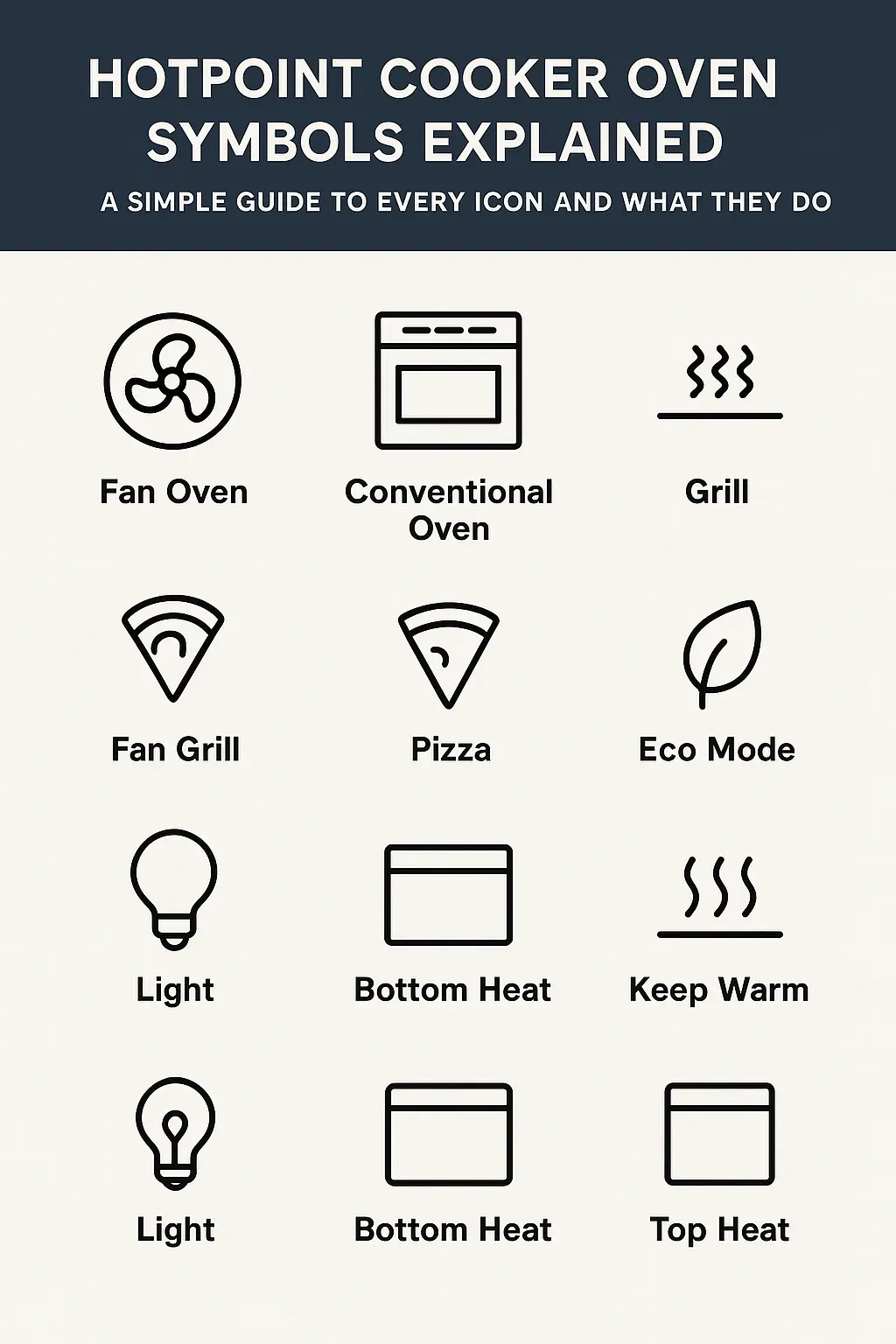
1. Fan Oven Symbol (A Circle With a Fan Inside)
This is one of the most loved symbols. It means the oven uses hot air that moves around the food. The fan spreads heat in all directions. This gives even cooking.
Best for:
-
Cookies
-
Cakes
-
Lasagna
-
Roasting vegetables
-
Roasting chicken
Why it works well:
Food cooks faster and more evenly. You do not need to turn the tray often.
2. Conventional Oven Symbol (Top and Bottom Heat)
This symbol shows two straight lines — one at the top and one at the bottom. No fan is used here.
Best for:
-
Bread
-
Cakes that need slow rising
-
Food that needs even natural heat
My tip:
I bake my banana bread in this mode. It rises softly and gets a warm brown top.
3. Grill Symbol (A Zig-Zag Line at the Top)
This symbol means heat comes only from the top. It is very powerful and great for browning the surface.
Best for:
-
Sandwiches
-
Cheese melting
-
Toast
-
Browning chicken skin
Warning:
Do not leave food under the grill for too long. It burns fast.
4. Fan Grill Symbol (Fan + Zig-Zag Line)
This gives you grilled food, but with less burning risk because the fan spreads the heat.
Best for:
-
Grilled fish
-
Chicken pieces
-
Vegetables
It cooks quicker than a normal grill.
5. Defrost Symbol (Snowflake Icon)
This mode uses no heat. Only the fan runs.
Best for:
-
Thawing frozen meat
-
Defrosting bread
-
Softening ice-cold food
I use this when I forget to take meat out of the freezer. It keeps the texture soft.
6. Pizza Symbol (A Slice Shape or Bottom Heat + Fan)
This mode gives extra heat to the bottom part of the oven. It makes crusts crisp.
Best for:
-
Pizza
-
Pies
-
Tarts
Your pizza base becomes crispy while the cheese melts nicely on top.
7. Eco Mode Symbol (Leaf Icon)
This mode uses less power. It adjusts heat slowly.
Best for:
-
Everyday baking
-
Saving electricity
-
Small meals
It takes a bit longer, but you save energy.
8. Keep Warm Symbol (Low Heat Waves)
This mode keeps food warm without overcooking.
Best for:
-
Curry
-
Rice
-
Pasta
-
Breads
When guests are late, this mode saves the meal.
9. Light Symbol (Light Bulb Icon)
This only turns on the oven light. No heat is used.
You can check your food without opening the door.
10. Bottom Heat Symbol (Line At the Bottom)
This mode only heats from below.
Best for:
-
Cheesecakes
-
Pastries
-
Food that must cook slowly from the bottom
11. Top Heat Symbol (Line At the Top)
This is the opposite of bottom heat.
Best for:
-
Browning
-
Light crisping
-
Finishing dishes
How to Use Hotpoint Oven Symbols (A Simple Step-by-Step Guide)
Here is a very easy way to choose the right symbol every time.
Step 1: Think about your food.
Is it something that needs even cooking?
Is it something that needs crisping?
Step 2: Look at the symbol.
Match the food with the right symbol from the list above. It becomes easy with practice.
Step 3: Set the temperature.
Every mode works best at a range. For example:
-
Fan mode: 160–180°C
-
Grill mode: 200–220°C
Step 4: Keep an eye on food.
Even though ovens are smart, it’s good to check halfway.
Step 5: Use timers.
This stops food from burning.
Extra Tips for Using Your Hotpoint Oven
These tips come from my own daily cooking.
Tip 1: Use shallow trays for fast cooking.
Deep trays slow down heat flow.
Tip 2: Preheat the oven.
This helps food cook evenly from the start.
Tip 3: Use the right shelf level.
Middle shelf = balanced cooking
Upper shelf = faster browning
Lower shelf = slow cooking
Tip 4: Clean the oven often.
Clean ovens heat better and faster.
FAQs Section for Better User Experience
How to work a Hotpoint oven using symbols?
Using a Hotpoint oven becomes very easy once you know what each symbol does. Think of the symbols as small instructions. Each icon tells the oven how to heat your food. For example, if you pick the fan symbol, the oven creates even heat all around your dish. If you choose the grill icon, heat comes only from the top, which helps in browning. To work the oven, choose the symbol based on the food you want to cook. Then set the temperature. Finally, place your dish on the right shelf. With practice, choosing symbols becomes natural.
What are the different symbols on the oven?
Hotpoint ovens come with many symbols, each meant for a different cooking style. Some common symbols are the fan oven icon, the grill symbol, the pizza mode, the defrost icon, and the eco mode. The fan symbol gives even cooking. The grill symbol browns food from the top. The defrost icon helps thaw frozen items. The pizza mode adds extra heat at the bottom for crispy crusts. Each symbol helps you cook better and faster. Once you understand these icons, you will see how simple oven use really is.
How to set Hotpoint oven temperature?
Setting the temperature on a Hotpoint oven is simple. First, choose the cooking symbol you want to use. After that, turn the temperature knob or use the digital buttons to set the heat. The oven will show the temperature on the screen. Most baked goods cook well at 160–180°C. Grilled foods need higher heat, around 200–220°C. Some dishes like slow roasts need low heat, around 140–150°C. Always match the temperature to the cooking mode. If you are unsure, it is better to start low and increase later.
Which symbol is used for baking in the oven?
The best symbols for baking are the fan oven symbol and the conventional oven symbol. The fan symbol helps with even heat flow, which makes cakes, cookies, and muffins rise well. The conventional oven symbol gives a soft and gentle heat that works perfectly for bread and pastries. Many bakers also use bottom heat for recipes like cheesecake. If you want simple baking, choose the fan symbol because it gives stable results. Once you learn how your oven behaves, you will bake with more confidence.
Final Thoughts
Oven symbols look confusing at first. But once you know what they mean, cooking becomes easy and even fun. I made many mistakes in the past because I guessed the symbols. But with time, I learned how helpful each icon can be. Now, I enjoy using my Hotpoint oven because it saves time and makes food taste better.
I hope this simple, clear guide helps you too. You can always return to this anytime you forget a symbol. With practice, you will use your oven like a pro.


You May Also Like

How Drain Problems Start and The Best Way to Stop Them Early
Confused by Your Smeg Oven Symbols? Here’s a Simple Guide to Decode Them