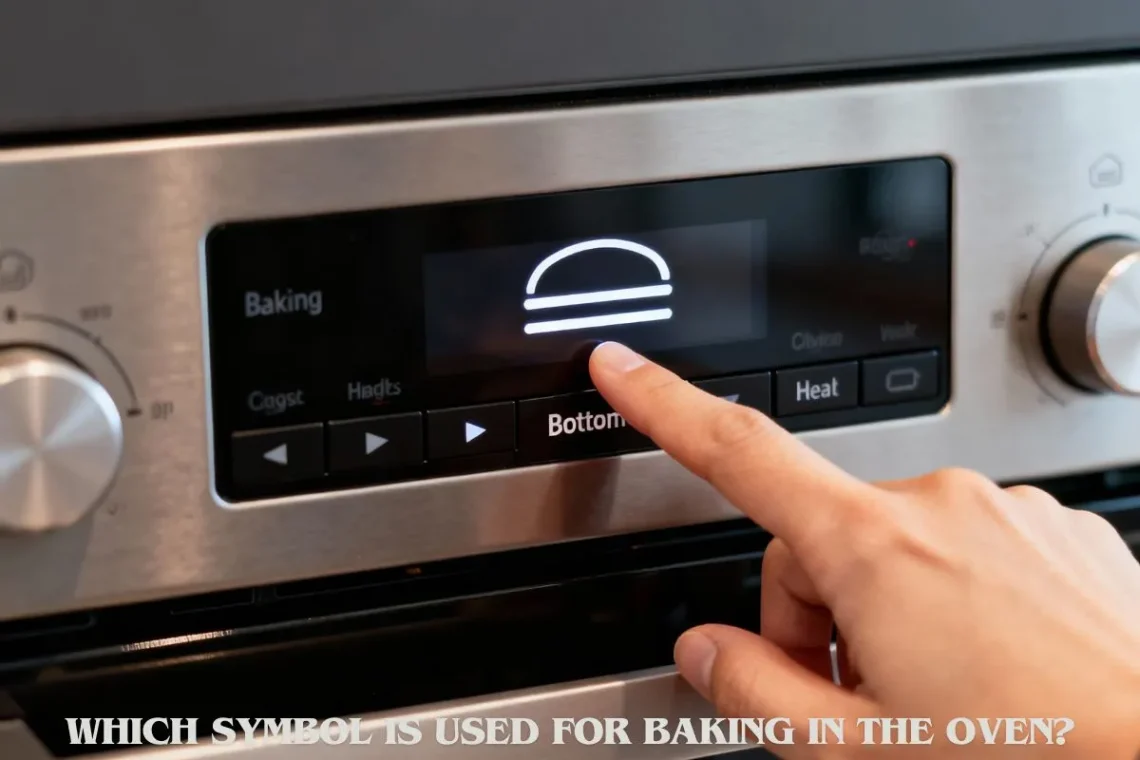
Which Symbol Is Used for Baking in the Oven? (A Very Simple Beginner Guide)
Many people feel confused the first time they look at an oven control panel. So many symbols. So many shapes. Some look like lines. Some look like fans. Some look like zigzag wires. It almost feels like reading secret codes.
If you ever stood in front of your oven wondering, “Which symbol is used for baking?”, you are not alone.
I felt the same when I baked my first cake years ago. I pressed the wrong symbol and accidentally turned on the grill. The top of my cake turned dark while the inside stayed raw. That day taught me something important—understanding oven symbols makes baking simple.
This guide explains everything in the easiest words so even a 5th-grade child can understand it.
By the end, you will know exactly:
-
Which symbol is for baking
-
Why that symbol is used
-
How it looks in different oven brands
-
How to avoid mixing it up with other symbols
-
How to use it for perfect results
-
And what to do if the bake mode is not working
Let’s begin with the most important part.
⭐ 1. What Is the Baking Symbol in an Oven? (Beginner-Friendly Answer)
The baking symbol in almost every oven is shown as:
👉 Two straight horizontal lines — one at the top and one at the bottom.
These two lines represent:
-
Top heating element
-
Bottom heating element
This mode is also called:
-
Conventional bake
-
Traditional bake
-
Top and bottom heat
This is the classic method of baking that people have used for many years.
Why this symbol?
Baking needs gentle heat coming from both the top and the bottom of the oven.
This helps food cook evenly inside and outside.
When I learned this, baking suddenly made sense. I no longer guessed which button to press. I understood the “why,” and that made everything easier.
⭐ 2. Why the Bake Symbol Uses Two Lines
The two-line system is simple:
-
The bottom line gives slow, even heat for rising and cooking the inside.
-
The top line gives light heat to brown the top of your food.
This is perfect for:
-
Cakes
-
Cookies
-
Bread
-
Cupcakes
-
Muffins
-
Pasta bakes
-
Lasagna
The top and bottom lines together give stable heat. Fans and grills are not needed for gentle baking.
⭐ 3. Quick Visual Guide to Common Oven Symbols
Here are symbols that often confuse people.
Let’s explain each one in simple words.
Bake Symbol (Two Lines)
Meaning:
Heat from top and bottom.
Great for cakes, cookies, and baked food.
Fan Bake Symbol (Fan + Two Lines)
A small fan inside a circle + two lines.
Meaning:
Bakes faster using hot air.
Insight:
Good for roasting, not always good for cakes.
Convection Fan Symbol (Fan Only)
A fan in a circle.
Meaning:
Hot air circulates quickly.
Cooks fast and evenly.
Grill Symbol (Zigzag Line at Top)
Looks like a lightning line on top.
Meaning:
Strong heat from top only.
Best for grilling meats and browning.
Defrost Symbol (Snowflake + Fan)
Shows a fan with a snowflake.
Meaning:
Moves room-temperature air to defrost food.
Bottom Heat Symbol (One Line at Bottom)
Meaning:
Heat only from bottom.
Used for dishes that need a crisp base.
Beginner Tip:
If you want to bake cakes, never choose the grill or fan-only symbol.
They can burn the top or dry out the food.
⭐ 4. How Different Oven Brands Show the Baking Symbol
Different brands show the baking symbol in slightly different ways.
But the meaning is the same everywhere: two straight lines.
Here is how some brands show it:
Bosch
Two clear lines. Very simple.
Samsung
Two lines, sometimes with icons inside a small square.
LG
Two lines, often inside a round dial section.
Whirlpool
Two lines, sometimes a bit shorter and spaced widely.
IFB & Morphy Richards (India)
Two bold lines in a box.
OTG Brands (Bajaj, Prestige, etc.)
They show two lines with numbers for adjusting temperature.
Even if the style changes slightly, the meaning remains the same:
When you see two horizontal lines, you are in baking mode.
⭐ 5. Real-Life Confusion: Baking Symbol vs. Other Symbols
Many people confuse the bake symbol with grill or convection symbols.
Let’s clear this confusion:
Bake (Two Lines)
✔ Best for cakes
✔ Gentle heat
✔ Even cooking
Grill (Zigzag Line)
✘ Not good for cakes
✘ Too strong
✘ Will burn the top
Fan Bake (Two Lines + Fan)
✔ Good for roasting
✘ Can dry cakes
✘ Makes cookies too brown
Convection (Fan Only)
✔ Good for quick cooking
✘ Not great for soft bakes
My personal story
One time, I accidentally used the grill symbol for cookies because the zigzag line looked “cool.”
My cookies turned dark brown on top but stayed soft underneath.
I learned the hard way that the bake symbol is the safest option for beginners.
⭐ 6. Best Settings to Use With the Baking Symbol
Once you choose the two-line bake symbol, here are the best settings to use.
Temperature Guide
Cakes
160–180°C (320–356°F)
Cookies
160–170°C (320–338°F)
Bread
180–200°C (356–392°F)
Lasagna / Pasta Bake
180–200°C
Pizza
220°C for crisp base
But pizza is better with bottom heat mode.
Rack Position
This is one of the most forgotten steps.
-
Cakes → Middle rack
-
Cookies → Middle rack
-
Bread → Middle rack
-
Roasts → Lower rack
-
Pizzas → Lower rack
If food burns on top, move one level lower next time.
When NOT to use the fan
-
For soft cakes
-
For cheesecakes
-
For muffins
-
For banana bread
Fan mode can dry them out or make them rise unevenly.
⭐ 7. Step-by-Step: How to Use the Bake Symbol for Perfect Results
Here is the simplest way to bake like a pro.
Step 1: Choose the Bake Symbol
Select the two horizontal lines.
Step 2: Preheat the Oven
Let it heat for 8–12 minutes.
Most ovens beep when ready.
Step 3: Place the Food on the Middle Rack
This helps heat spread evenly.
Step 4: Set the Timer
Use the recipe as a guide.
Check 5 minutes before the time ends.
Step 5: Do the Toothpick Test
Stick a clean toothpick into the cake:
-
If it comes out clean → baked
-
If wet → bake 5 more minutes
Step 6: Let It Cool
Cooling helps the food set well.
Never cut a cake while it is hot.
⭐ 8. Personal Story: My First Baking Mistake
The very first time I baked a cake, I used the fan grill symbol instead of the bake symbol.
I thought the fan meant “faster cooking.” I was wrong.
My cake rose fast, cracked on top, and turned brown before the inside cooked.
When I cut it, the center was sticky like raw batter.
Later, a friend told me,
“Always use the two-line symbol for baking. It is the safest.”
Once I switched to the bake symbol, everything changed.
My cakes looked smoother, cooked evenly, and tasted better.
Sometimes the simplest symbol makes the biggest difference.
⭐ 9. Troubleshooting: When the Bake Symbol Doesn’t Work as Expected
Sometimes the oven still gives problems even if you choose the right symbol.
Here are the most common issues:
Problem 1: Oven not heating
Possible causes:
-
Heating element is faulty
-
Thermostat is damaged
-
Power plug is loose
Check the basics first.
Problem 2: Uneven cooking
Solutions:
-
Use the middle rack
-
Preheat longer
-
Avoid opening the door too often
-
Do not place foil on the bottom (blocks airflow)
Problem 3: Food burns on top
Fix:
-
Lower the rack
-
Reduce temperature by 10–20°C
-
Do not use grill by mistake
Problem 4: Fan runs even in bake mode
Some modern ovens use a small internal fan for air circulation even in bake mode.
This is normal and does not affect baking.
Problem 5: Cakes sink in the middle
Reasons:
-
Door was opened too early
-
Batter was overmixed
-
Temperature too high
Use middle heat and do not check before 20 minutes.
Which oven symbol is for baking?
The oven symbol used for baking is the one with two straight horizontal lines, one at the top and one at the bottom. This symbol means the oven is giving heat from both directions in a gentle and even way. This is the best setting for cakes, cookies, bread, and almost all normal baking recipes. When you use this symbol, the heat spreads slowly through the oven. It helps your cake rise well and helps food cook evenly from inside and outside. If you are unsure which symbol to pick, the two-line symbol is almost always the safest choice for baking.
Which is the baking mode in the oven?
The baking mode in an oven is the mode that uses both the top and bottom heating elements together. This is shown in the symbol with two horizontal lines. In this mode, the heat rises slowly from the bottom and lightly browns the top. This is perfect for items that need soft and steady heat such as cakes and cookies. Many people confuse the baking mode with grill or fan mode, but grill is too strong and fan mode can dry out food. So if you are trying to bake something for the first time, always select the two-line bake mode.
How do I know my oven is C or F?
You can know if your oven is set to Celsius (°C) or Fahrenheit (°F) by checking the temperature numbers on the display. If the numbers go from around 100 to 250, your oven is in Celsius. If the numbers go from around 200 to 500, your oven is in Fahrenheit. Many modern ovens allow you to change between the two units in the settings. Some ovens also show the symbol “°C” or “°F” beside the number. If you do not see it, check the manual or long press the temperature button to switch units. Knowing your temperature unit avoids underbaking or burning food.
What is the baking mode symbol in OTG?
In an OTG (Oven Toaster Grill), the baking mode symbol also uses the two horizontal lines, one at the top and one at the bottom. However, many OTGs let you choose which heating rod to use manually. For baking, you must select both rods ON. This gives the same effect as the bake symbol in a normal oven. OTGs also let you adjust the temperature, timer, and rack level. If you only turn on the top rod, you will get grill mode. If you only turn on the bottom rod, you will get bottom heat mode. So for baking, always use both rods together.
⭐ Final Thoughts
The baking symbol in any oven is very simple: two horizontal lines.
This symbol gives the best, most even heat for cakes, cookies, bread, and many baked dishes. Once you understand it, baking becomes stress-free and even fun. You do not have to guess, worry, or test random buttons anymore.


What Do Oven Modes Mean?
You May Also Like
Garage Door Not Opening or Closing? Common Problems & Easy Fixes

Modern Farmhouse Furniture Styling Ideas: Cozy Meets Contemporary