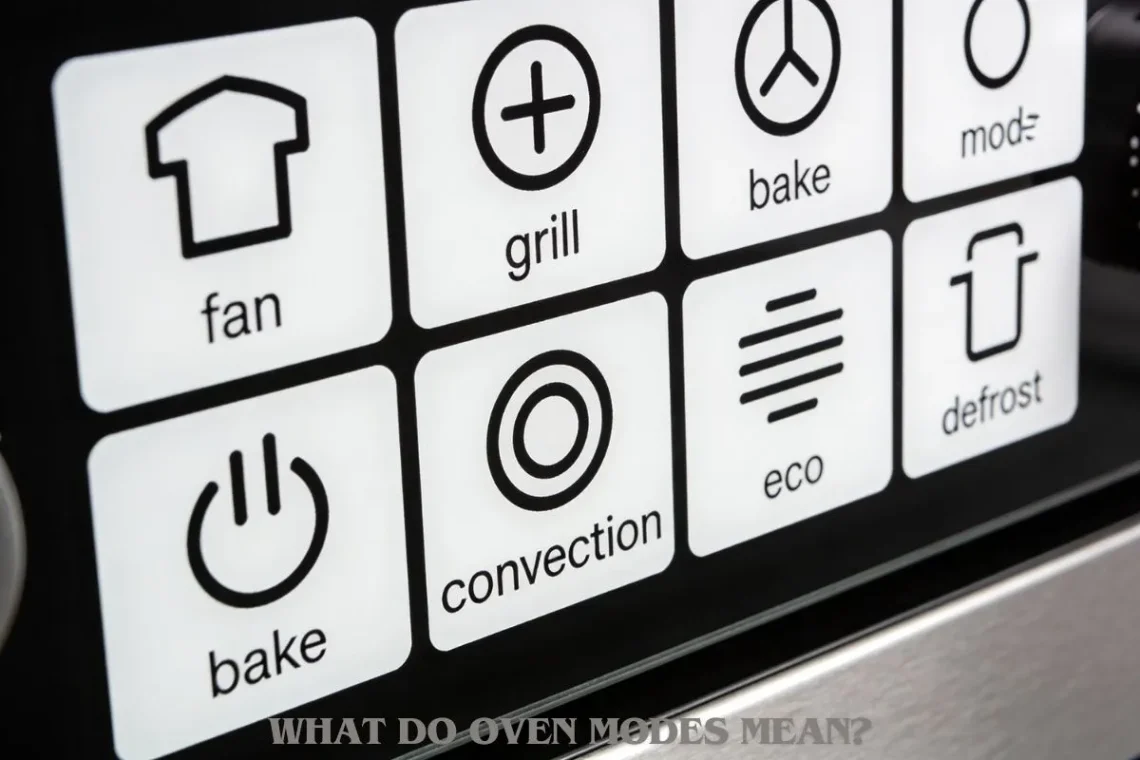
What Do Oven Modes Mean?
A Simple, Plain-English Guide to Oven Modes and What Each One Is Used For
If you have ever stood in front of an oven and stared at the dial, you are not alone.
I remember the first time I moved into a rented flat. The oven had tiny symbols. No words. Just lines, fans, and shapes. I wanted to bake a simple cake. I pressed one setting. The top burned. The middle stayed raw.
That day, I learned something important.
Ovens are not hard to use.
But oven modes are very confusing if no one explains them.
This guide explains oven modes in plain English. No technical talk. No guessing. Just clear answers for everyday cooking.
Why Oven Modes Confuse So Many People
Oven modes confuse people for a few simple reasons.
First, most ovens use symbols instead of words.
Second, different brands use slightly different icons.
Third, many manuals are long and hard to read.
Most people just turn the knob and hope for the best.
That works sometimes.
But it often leads to:
-
Burnt food
-
Uneven cooking
-
Dry cakes
-
Soggy pizza
Understanding oven modes fixes these problems fast.
What Are Oven Modes, in Simple Words?
Oven modes tell the oven how to heat your food.
Each mode controls:
-
Where the heat comes from
-
How the air moves
-
How strong the heat is
Think of oven modes like tools.
You would not use a hammer for every job.
In the same way, you should not use one oven mode for everything.
What Are the Different Modes on an Oven?
Most modern ovens have these common modes.
Let’s go through them one by one.
Conventional Heat (Top & Bottom Heat)
What it looks like
Two straight lines. One at the top. One at the bottom.
What it does
Heat comes from the top and bottom elements.
No fan. No air movement.
Best for
-
Cakes
-
Bread
-
Biscuits
-
Traditional baking
This mode gives gentle, even heat. It is slow but reliable.
When I bake birthday cakes, I always use this mode. It gives me the most control.
Fan Oven (Convection Oven)
What it looks like
A fan symbol, sometimes with a circle around it.
What it does
A fan moves hot air around the oven.
Food cooks faster and more evenly.
Best for
-
Roasts
-
Multiple trays of food
-
Cookies
-
Frozen food
Fan ovens are great for busy homes.
But they cook hotter.
Lower the temperature by about 20°C compared to conventional ovens.
Grill Mode
What it looks like
A zigzag or wavy line at the top.
What it does
Heat comes only from the top.
Very strong heat.
Best for
-
Toast
-
Cheese melting
-
Sausages
-
Browning food
Never walk away from the grill.
Food can burn quickly.
I once left cheese toast under the grill for one minute too long. It turned black fast.
Fan Grill Mode
What it looks like
A fan with a zigzag line.
What it does
Strong top heat plus moving air.
Best for
-
Chicken
-
Thick meat
-
Crispy skin
Fan grill cooks faster than normal grill.
Watch food closely.
Bottom Heat Mode
What it looks like
One straight line at the bottom.
What it does
Heat comes only from the bottom.
Best for
-
Pizza bases
-
Pies
-
Quiche
This mode helps crisp the bottom without burning the top.
Defrost Mode
What it looks like
A fan with no heat lines.
What it does
Moves air without heat.
Best for
-
Thawing frozen food
-
Defrosting bread
It is gentle and safe.
Pizza Mode
What it looks like
Varies by brand. Often fan + bottom heat.
What it does
Strong heat from below with air circulation.
Best for
-
Pizza
-
Flatbreads
This mode gives crispy bases and cooked toppings.
Eco Mode
What it looks like
“Eco” text or leaf symbol.
What it does
Uses less energy.
Cooks slower.
Best for
-
Long cooking meals
-
Reheating
It saves power but needs patience.
What Are the Symbols in the Oven?
Oven symbols are pictures that represent modes.
They show:
-
Heat direction
-
Fan use
-
Special features
Once you learn the basics, symbols become easy.
Two lines = top and bottom heat
Fan = air movement
Zigzag = grill
Oven Symbols vs Oven Modes
This is important.
-
Oven mode = how the oven works
-
Oven symbol = picture that shows that mode
Different brands may use different pictures for the same mode.
Always focus on what the symbol does, not how it looks.
What Each Oven Mode Is Best For (With Examples)
Here is a simple guide:
-
Cake → Conventional heat
-
Roast chicken → Fan oven
-
Toast → Grill
-
Pizza → Pizza mode or bottom heat
-
Frozen food → Fan oven
-
Bread → Conventional heat
Keep this list in mind. It saves mistakes.
Fan Oven vs Conventional Oven: When to Use Each
Fan Oven
-
Faster
-
More even
-
Lower temperature
Conventional Oven
-
Slower
-
Gentle heat
-
Better for baking
If your food dries out often, try conventional heat.
If food cooks unevenly, try fan mode.
How to Choose the Right Oven Mode Quickly
Ask yourself three questions:
-
Is it baking or roasting?
-
Does it need even heat or strong heat?
-
Does it need a crispy top or bottom?
Your answers point to the right mode.
Busy days need fan ovens.
Careful baking needs conventional heat.
Common Mistakes People Make With Oven Modes
Many people make the same mistakes.
Using grill for baking
Grill is too strong.
Forgetting to lower temperature on fan ovens
This causes burning.
Wrong shelf position
Middle shelf is safest for most cooking.
Not preheating
Cold ovens ruin baking.
I learned preheating the hard way. Flat cakes every time.
Do Oven Modes Change Cooking Time or Temperature?
Yes. Very much.
Fan ovens:
-
Cook faster
-
Need lower temperature
Grill:
-
Cooks very fast
-
Needs close watching
Bottom heat:
-
Takes longer
Always adjust based on the mode.
Brand Differences in Oven Modes
Different brands name modes differently.
-
Beko: Simple icons, strong fan modes
-
Bosch: Many fan options
-
Hotpoint: Clear symbols
-
Smeg: Stylish icons, same functions
The function is usually the same, even if the symbol looks different.
Safety Tips When Using Oven Modes
-
Never leave grill unattended
-
Use oven gloves
-
Keep children away
-
Do not cover oven vents
Safety matters more than speed.
What Oven Mode Should I Use for Baking?
Use conventional heat.
It gives gentle and steady heat.
Perfect for cakes, bread, and pastries.
What Is the Best Setting to Use on the Oven?
There is no single best setting.
The best setting depends on:
-
Food type
-
Time available
-
Desired texture
Learning modes gives you control.
Final Thoughts: Oven Modes Are Your Friend
Oven modes are not there to confuse you.
They are there to help you cook better food.
Once you understand them:
-
Food tastes better
-
Cooking feels easier
-
Mistakes reduce
I wish someone explained this to me years ago.
Now you don’t have to guess.
Your oven is smarter than you think.
You just needed the decoder.


You May Also Like
A Simple Step-by-Step Guide on How to Operate an Oven in the UK (For Complete Beginners)
How Much Does an IKEA Kitchen Remodel Cost? (2025 Guide)