Which Symbol Is Fan Bake? Oven Fan Symbol Explained
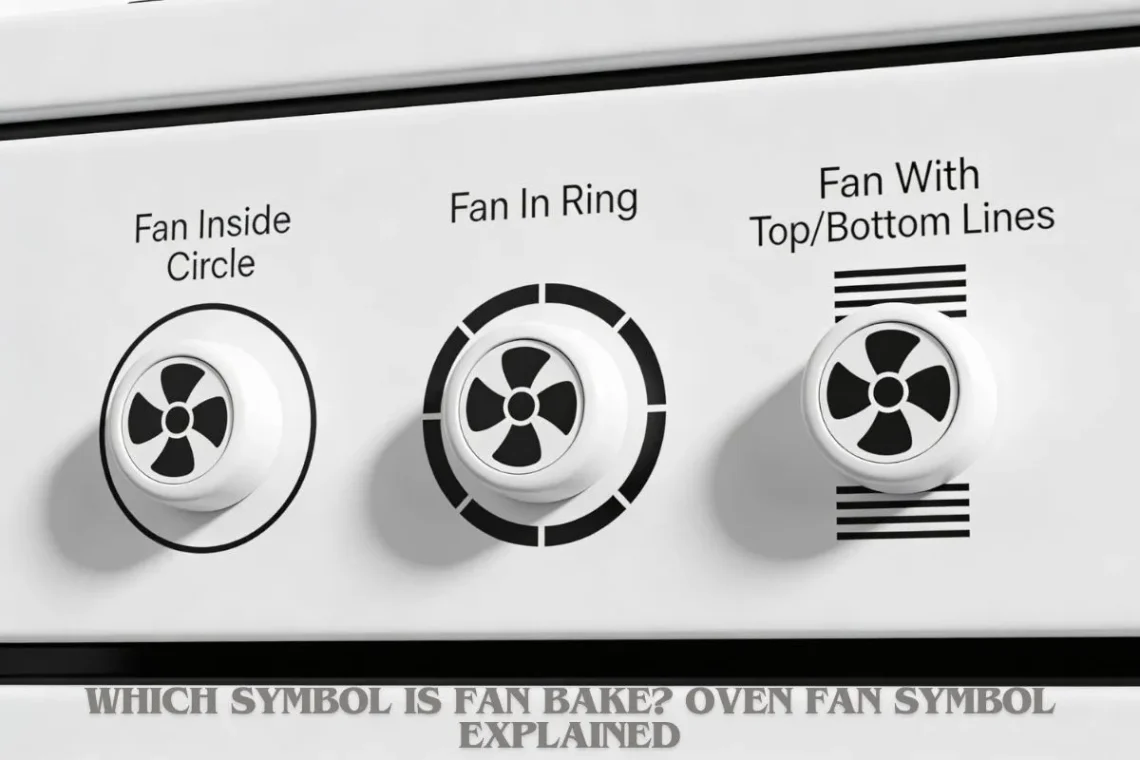
Fan bake symbols show a fan inside a circle or ring, often with heat lines. This mode uses a fan to spread hot air evenly in the oven. Knowing the exact symbol helps you pick the right setting fast.
What fan bake actually means
Fan bake, also called fan oven or convection bake, uses a fan at the back of the oven to push hot air around. This makes heat spread evenly so food cooks the same way no matter where it sits on the rack.
Without the fan, ovens have hot spots near the top or bottom. The fan fixes that. It also lets you use a slightly higher temperature or shorter cooking time than normal baking. For example, if a recipe says 180°C for 30 minutes, fan bake might need 160–170°C for the same result.
When my oven broke last year, I had to borrow my neighbor’s. Her fan bake setting saved a whole batch of cookies that would have burned on one side in a regular oven. That even heat made a big difference in everyday cooking.
The most common fan bake symbols explained
Oven symbols vary a bit by brand, but fan bake ones all show a fan. Here are the main types.
Fan inside a circle
This is the classic fan bake symbol. A simple fan blade sits inside a full circle. The circle stands for the oven walls. You will see this on brands like Bosch, Siemens, and many built-in models.
It means the fan spreads heat from the elements around the oven. No grill is involved.
Fan with a surrounding ring
Here the fan is inside a thick ring, like a donut shape around it. The ring shows the oven chamber. This version appears on Hotpoint, Indesit, and some Zanussi ovens.
The ring often has small lines or waves around it to show hot air moving.
Fan with top and bottom lines
This symbol has a fan in the middle, with one line across the top and one at the bottom. The lines mean heating elements are on both ends, and the fan moves the air.
Common on Whirlpool, Electrolux, and some AEG models. It is the same as fan bake, just drawn differently.
Fan alone (varies by brand)
Some ovens show just a fan icon without extra shapes. This is rarer but shows up on older models or compact ovens. Check your manual if you see only a fan – it is usually fan bake.
A quick way to spot it: if the fan symbol has no grill lines (zigzag) or top-only lines, it is likely fan bake.
Fan bake vs fan grill vs conventional bake symbols
Mixing up these settings can ruin a meal. Here is a simple side-by-side.
| Setting | Symbol | What it does |
|---|---|---|
| Fan bake | Fan in circle/ring | Fan + top/bottom heat for even baking |
| Fan grill | Fan + zigzag line on top | Fan + top grill for browning/roasting |
| Conventional bake | Square or lines top/bottom | No fan, just top/bottom heat |
Fan bake cooks evenly all over. Fan grill adds crispy tops. Conventional bake is slower and less even.
Once I grabbed the fan grill symbol by mistake for a cake. The top burned while the middle stayed raw. Now I double-check the symbol before hitting start.
Why fan bake symbols look different across brands
Each maker designs its own symbols, but they follow basic rules. Beko might use a fan with wavy lines. Smeg has a more artistic fan circle. Bosch keeps it simple with a plain fan ring.
Why the changes? Brands want unique looks for their controls. Also, some ovens have more modes, so symbols get tweaks to fit.
The good news: the fan part is always there for fan bake. If you see a fan without a grill zigzag, you are usually safe.
What foods are best cooked using fan bake
Fan bake shines for items that need even cooking.
-
Cakes and muffins: Rise straight and bake without sinking in the middle.
-
Cookies and pastries: All trays finish at the same time.
-
Roasts and casseroles: Heat reaches every side evenly.
-
Frozen foods: Pizzas and chips cook fast without flipping.
-
Batch baking: Multiple trays of bread or pies done together.
It is less ideal for delicate custards or soufflés, where gentle heat matters more. Stick to conventional for those.
A family favorite is fan-baked apple crumble. The even heat crisps the topping perfectly every time, no soggy spots.
How to use fan bake correctly
Get great results with these easy steps.
-
Preheat
-
Turn on fan bake and let it heat for 10–15 minutes. The fan should hum steadily.
-
-
Adjust temperature
-
Drop it by 10–20°C from conventional recipes. For example, 200°C normal becomes 180°C fan.
-
-
Pick the right shelf
-
Middle rack for single trays. Space them out for multiples so air flows.
-
-
Use trays wisely
-
Shiny metal for crisp bottoms. Glass for even browning. Avoid overcrowding.
-
Test with a simple recipe first. Cookies are forgiving and show if your oven runs hot or cool.
Common mistakes people make with fan bake mode
Small errors add up fast.
-
Wrong temperature: Using full recipe heat dries out cakes or burns edges.
-
Overcrowding trays: Blocks air flow, so food cooks unevenly.
-
No preheat: Food sticks or takes too long.
-
Wrong rack: Top rack can over-brown; bottom can undercook.
I once put bread on the top shelf without thinking. The tops got too dark before the middles set. Lesson learned: always middle rack for even results.
How to tell if your oven is actually in fan bake mode
Not sure if it worked? Look for these signs.
-
The fan symbol lights up on the display.
-
You hear a steady whir from the back.
-
Heat feels even when you put your hand near the door (carefully).
-
Food colors uniformly, no hot spots.
If the fan is silent or only the top glows red, it is not fan bake.
Fan bake not working? What to check
No fan sound or uneven cooking? Try these fixes.
-
Check the door seal: Gaps let heat escape.
-
Clean the fan vents: Grease buildup blocks it.
-
Test the selector: Turn off, unplug 5 minutes, try again.
-
Call service if the fan symbol lights but no hum.
Most fixes are simple. One time my fan quit – just a dirty filter. A quick clean fixed it.
Quick fan bake symbol cheat sheet
| Symbol sketch | Brand examples | Mode |
|---|---|---|
| Fan in circle | Bosch, Siemens | Fan bake |
| Fan in ring | Hotpoint, Zanussi | Fan bake |
| Fan + top/bottom lines | Electrolux, AEG | Fan bake |
| Fan + top zigzag | Most brands | Fan grill |
Print this or save it on your phone for quick reference.
What is the icon for a fan oven?
The fan oven icon is almost always a fan inside a circle or square ring. Sometimes wavy lines show air movement. It is different from a plain fan (rare) or fan with grill lines. Brands like Beko use a fan with heat waves. Always match it to your oven dial or manual for sure.
Which symbol is used for baking?
Baking symbols split into two main types. Conventional bake is top and bottom lines or a square. Fan bake adds a fan to that. If you want even results, pick the one with the fan. Plain lines mean no fan, so watch for hot spots.
What is the bake symbol on OTG?
On oven toaster grills (OTGs), bake is usually top and bottom heat lines without a fan. Many small OTGs lack fan bake. Look for equal lines top and bottom. Some models add a fan circle for convection mode. Check your model – brands like Morphy Richards label it clearly.
How do I know my oven is fan?
Your oven is in fan mode if the fan symbol glows, you hear the whir, and air moves inside when you peek through the light. Heat spreads fast and even. Food browns the same on all sides. If it is quiet or heat pools at the bottom, switch to the fan symbol and preheat again.
Fan bake makes cooking simpler and more reliable once you spot the symbol. Next time you bake, check twice – your food will thank you.

What Do Oven Modes Mean?

You May Also Like
Why Is My CDA Oven Not Heating Up?
Wall Charger Safety Tips: Protecting Your Home and Devices